How and when did I start using computers and when did I start using Linux?

Well, talking about personally having a computer, that takes me back 5 years.My brother bought me a computer just 10 days before my 12th board exam. All I knew when sitting in that car from Trichur railway station to Edappal with the computer at the back was that I could play games without depending on anyone any more.

I remember computers when I was four years old. At that time we were in gulf and my brother owned a PC. That was in 1992 approximately and you could imagine its configuration. Frankly, I don’t know its configuration but I’m guessing a few kBs of RAM and… Man, I don’t even know how low I can go with this!

Right now, thinking about the first time that I remember seeing a computer brings this scene to me. I’m sitting on the floor in my brother’s room at our apartment and playing with some toys. I look up a and see my brother playing the “Simpson’s Arcade game”. I don’t know why but I still feel good thinking about that game and I vaguely remember the scenes from it.

Mom comes with food for me and I remember my brother sitting away from the computer and letting me sit in front of it. He put the game “Fox” for me and I would sit and play that while Mom gives me my food. I’ve been able to gather that Fox was one of the really popular games at that time.

There you go! That’s my start with computers.

From then on it has been the equation, computers = games, for me till roughly my eighth standard when I was introduced to MS paint at my school.

I’ve been a raving video game addict from my childhood onwards and it has been only two or three years since I’ve rid myself of that addiction. These days I don’t play games at all and I kinda miss it.

Thinking back, lots of my memories are about playing video games with my cousins, my brother, my dad and my sis. Most of them are pleasant memories while there are unpleasant ones too where my addiction was exploited and some of my cousins wouldn’t let me play their games.

So far I’ve owned 15 8-bit games, 5 16-bit mega drives and 3 PS-1s and 1 Game Boy Advance SP. The number of cassettes and the cheating and transactions are so much that they are better off for another post.

My addiction for computer games only grew when I realised that there were cooler games. There was this computer center near my home and the guy who owned it would let me play some racing games on his system. I only knew “Up, down, left and right” and one day he showed me how to change the desktop wall paper which was like this “great” knowledge about computers!

My brother had by this time bought a Laptop (one of his dreams) and would let me play Sands of time/Deus Ex on it whenever he came home from Bangalore.

So things went on like this until the day I got my computer 10 days before my 12th exam. My brother took it all out, assembled it and turned it on for me. He showed me a menu that comes at the beginning (which I later on realized was GRUB) and told me to select Ubuntu. I did. It was version 7.10 or something back then. He told me to check it out. I was introduced to Linux.

Obviously, my first question was “Where can I play games from!?”. He showed me a few games in Ubuntu with which I wasn’t amused at all. He told me how to restart and logged me into Windows. I don’t exactly remember how it kicked off but my guess is that it was Deus Ex itself. An awesome game even though pretty old.

He simply gave me an advice that if I wanted to hear songs, play videos, look at photos, insert video cds, etc, I were to use Ubuntu and whenever I wanted to play games, I could use Windows.

My brother also did not let me play any pirated games. He told me to never borrow games from my friends. Whenever I wanted a new game, I was to ask him and he would buy me an original one. I did not know what was wrong with him then but today, I think I understand what he meant.

Now and then, he would tell me about Linux. That what I was using was free and I could make any changes that I wanted in it. At that time my freedom was that I could delete the panels, resize them, change the applets on them whereas in Windows the start button and the panel at the bottom would remain the way it was. I even remember telling this seriously to someone making my point that Linux was free.

Oh and the all too familiar belief of viruses not affecting Linux was also there.

Till reaching college, such was my life. It was only after reaching college that I heard the word ‘programming’ and ‘computer languages’. It was then when the things that my brother told me started making a bit of sense.

It was during this year that I moved further into using Linux because one day my Windows was affected with a virus and it was a complete headache until my brother came and reinstalled it for me. After that, I became a supporter of Linux with little knowledge of what ‘free, open source, Ubuntu, Fedora’ etc meant.

First year too went by uneventfully with me playing Oblivion, the elder scrolls. My brother would tell me to read Dennis Ritchie and practice coding. But I guess I never listened to him. Now that I start understanding the world of computers and programs, I realize more and more the mistakes I have made in not listening to my brother. I seriously had not done any sort of coding on my system during my first year. I would copy some seniors programs and show the output in our labs.

Optimistically, my brother bought me a laptop during the end of my third semester. But then too, the only thing that I used it for was to listen to music and everyone at hostel even termed it as my ‘walkman’.

The first time I did a program on my system was when I was learning for my s3 university lab exam I guess. At the end of that year was when my brother introduced me to GSoC. He helped me download and install the tuxmath game. It was then when I started experimenting for the first time.

That was my entry into open source.

From then on I started hearing and seeing things related to it and from then on did my journey further into the world of freedom began!

Upgrading to Ubuntu 12.04 – The way I did it.

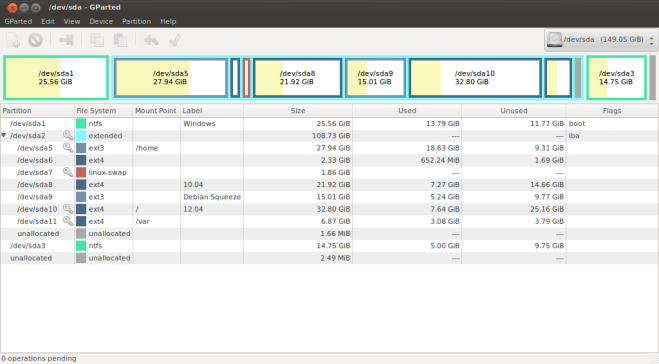
“Never mess with your stable” is a lesson that I have learnt and is a mantra that I hold close to my heart. Especially when you have a good choice not to mess with your stable, you simply shouldn’t mess with it. Hence, I left my 10.04 unscathed and installed my 12.04 in another partition. Here is a screen shot of my hard disk :

After installing, the first thing I did was to get rid of unity. Boy, do I hate that. I did the following to accomplish that:

sudo apt-get remove unity unity-2d

I installed Gnome by

sudo apt-get install gdm gnome-shell

I tried it and have reported a few bugs so far. You must have noticed that I have only one /home partition and I have let both my 10.04 and 12.04 mount that as their /home partitions. I wonder why nothing is getting screwed up considering a common .bashrc file being there.

Anyway, the point reached where I decided to switch entirely to 12.04 and leave 10.04 behind. But for this, I needed to have all the softwares that were there on 10.04 to be installed on my new 12.04. Even though I vaguely knew the steps of how to do this, I asked for help and got a tremendous help from http://askubuntu.com/

You can read the conversation from the site here, but I’ll be explaining the steps right now.

1. First you have to know which all packages are installed in your 10.04. For that you can do

sudo dpkg --get-selections "*" > pack_file

After running that, you will have the names of all the packages in 10.04 in the file called ‘pack_file’.

2. Transfer that file to 12.04 and run the following commands

sudo apt-get update
sudo dpkg --set-selections < pack_file
sudo apt-get -u dselect-upgrade

This will fetch all the packages as well as their dependencies and install it on your system. I had to download about 2GB of data but was at peace that my distro won’t get ruined. Maximum my “apt” and “dpkg” might suffer but then again, these two have been going through tests like these and more continuously for the last decade!

I wish this would be the end of this post. But no. I had maintained a separate partition for /var (/dev/sda11) which was only 3GB in size at first. Therefore, after downloading my 2GB files, when trying to unpack and install them, it ran out of space and my package installation quit halfway. Even though update manager popped heroically and offered me a so-called “partial upgrade”, it kept on crashing complaining that I had no space left which was, unfortunately, true.

In order to work around this problem, I did the following.

Well, I followed the obvious way of jumping back to my 10.04, launched gparted, and shrank the 12.04 root partition and allocated that space to /var. Then I came back in to 12.04 and tried this :

sudo apt-get -u dselect-upgrade 

However, that told me I had messed up dpkg and I had to manually run

sudo dpkg --configure -a 

in order to clean the mess up. I did so and again ran the first command which resulted in everything being installed correctly and peacefully. 🙂

So the world is a brighter place once again in which I’m going blaze my trail with the PrecisePangolin!

PS : For a few problems that I personally had with 12.04, visit this page.

DebianUtsavam 2012 – Medal of Honor!

Yet another memorable event at MES, Kutipuram! I must say I’m starting to enjoy my life now. I had no clue the event would turn out to be such an enjoyable one when Praveen ettan first mailed us telling us to get it together on short notice.

There is one milestone in my life that I simply have to mention here and that is, it is the first time I’m getting a medal in my entire life! I’m just so happy that it was for my effort at teaching too. Here it is.

Day 1  (28/04/2012) – Welcome to GNU/Linux!

After attending the release party not a month ago which consisted of about 10 people, I was amazed to see around 30 for this event. Most of them were a group of young foss enthusiasts who knew they had to learn about it and they wanted to learn too.

The event was scheduled to start at 9.30am. But holding up the philosophy of “All good things to those who wait”, we started the event sharp at 10.30am with Ershad, the tallest foss hacker among us, inviting the new ones among us to freedom as well as rejuvenating the rest of us. I could say he got through to us with his cycle. Lol! His session lasted for about half an hour and at about 11:00, it was time to get techy and Nakul was the one who was going to get us so.

Let me mention Nakul and Kiran here. Nakul has this “Alright everyone! I’m here so you guys have nothing to worry about. Let me handle it” attitude and his presence made the entire occasion joyful. Whereas Kiran had this “Yup, you are doing great and all of us are learning from you” attitude. Both of them together were an awesome team in organizing as well as getting the event to go forward smoothly. Great and awesome guys to be with. Its an honor to have gotten to know them.

So at 11:00, Nakul came forward with his arsenal of commands. Ummm… Usually people commands the Arsenal I guess but what the heck…

Anyway, command line and shell scripting were his topics. He ordered each of us to go and sit in front of a system and he started his session. Starting from the very basic of changing directories and creating folders (recursively and not), he took us to tee even! Not tee as in “tee hee” but tee as in the command used  to “read from standard input and write to standard output and files”. Changing the permissions, ownerships (leaving poor Kiran both ‘ownerless’ and ‘permissionless’ over a few files!), the representations of ownerships and all were covered. He more or less taught us the heads and tails of more, less, head and tail. He he… Sorry bro,just couldn’t resist writing that sentence and nope! He exactly taught us, along with examples, what all those four commands meant. He wound up his session with the hierarchical structure of the Linux file system at about 12:oo.

However, we were blessed with a senior pass out from MES itself by the name of Haris (Not me!) and he came forward to share with us his experiences in real life about using GNU/Linux. From how he knew Ubuntu to be just a software to remove viruses to how he actually started using Linux to live. It was pretty enlightening know that all of us had much to hope for.

At about 12.15, we stopped for lunch. However, none of us were ready to give up on foss even during Lunch and I was pretty much amazed at the Discussion Sadiq and Ershad had over their lunch. While I’m one who walks around using free software/open source software (Please note that I’m writing both here as Sadiq is going to be reading this), I’ve never dug deep into the roots of its philosophies. But Sadiq had and frankly, he has done an amazing job at it. He exactly knew what he was talking about while supporting Stallman. He wouldn’t settle, no matter what, for using just ‘Linux’ over ‘GNU/Linux’. The discussion heated up the curries and rice on the table which ended in finally Ershad admitting that Sadiq was right. My stomach was too full by then I guess! Ha ha…

We prayed and got back to the labs at about 1.30 and it was my session then. But I let Ershad handle the introduction to my session and sat back while he nicely demonstrated how apt-get, synaptic and all worked along with how software installation in Linux (No! GNU/Linux) was different from that of Windows. He concluded his session at about 2:00pm.

Then I came forward and I guess no one had any clue that I was scared out of my wits! It was the first time I was taking a technical session and suddenly I felt that I was going to mess it up completely. I really felt to howl and shout out aloud, beat a few times on my chest (Like King-Kong) and cool off my tension. But fearing that would further scare all those present there (I was scared enough for all of them), I pulled myself together and started my session.

I’m not writing down my entire session here because that might remind me of more than I want to remember. He he.. My session was on “installing from source” and I had taken the tuxmath game (http://tux4kids.alioth.debian.org/tuxmath/index.php) as an example. Everything seemed to go well with everyone encountering errors while running their configure scripts and them slowly solving it when all of a sudden came the worst nightmare of every developers – The Horrendous Dependency problems! (reminds me of how Labeebka raised one hand and shouted “Jai Ubuntu!”) No one could install softwares using apt-get because of “Unmet dependencies”, “broken packages” and what not! The lab was infected with confusion and the threatening dependencies popping up everywhere! Sajith sir, Nakul, Ershad, Sadiq and me where on full swing trying to solve these but as much as we tried to solve things, we began to realize that that much things were screwed up.

However, while all of this was going on, the group of  Shamsudheen sir (I hope that is what his name is!) and the sir from the mech dept. (can’t remember his name but I think it is Ayush) got the source installation correct and boy was it a weight off my heart to see the game up and running on their system. I had no idea the game required “Teacher’s privileges” to be installed. Lol! After this happening, unfortunately for our efforts, the internet connection was down and out for the day at 3:00pm and we could not proceed with fixing the Debian system there. Sadiq managed to copy the required library files from the computer in which the installation worked into one of the computers among the girl’s batches and the game worked there too. I concluded my session there telling them the rest of the steps in the installation process and here I forgot to mention an important point. I can only hope the ones who attended will be reading this.

NOTE: While installing from source, the first thing you should do is not run ./configure, but to see whether there is a README or INSTALL file within that folder. This is because ./configure, make and make install are the steps used for softwares that are developed using the GNU make philosophy. But there are many other softwares that will have to be built in a different manner and the instructions for these will be contained in the README or INSTALL file.

Here let me mention Sajith sir. An awesome person who is ready to help when and where help is needed without invitation. He knows how everything works and has a solution for any problem that happens in that lab even if he has to sit and hack at it for long hours. If it weren’t for him, Mine and Nakul’s session wouldn’t have imparted as much as it had imparted. From what I have heard from the students there at MES, he is a teacher under whom the students are proud of having learned! But alas, he is leaving MES to pursue his M. Tech in the coming June. That will be a great loss for them as well as for us as he is the backbone of such events being conducted there. A kernel lover at heart, he aims at making a serious contribution before he returns back to his profession again. Wishing him all success!

Coming back to the event, after I clumsily concluded my session at about 3:00, Sajith sir came forward with a beautiful explanation of what Makefiles are and how they worked. Once his small session was over, our “guest of the day” reached the venue. Mr. Labeeb Mattra and man, did  he have the cutest smile among all! He had this childish face with a geeky spectacle and a whole lot of Debian and FOSS philosophy oozing out of him.

His session was on the Debian philosophy, how it came to be and why it was so. He started at about 3:30 and took us through the romantic world of Debra and Ian (Deb-ian), told us why we needed to support the existence of Debian in our society even if we didn’t use it, how the elections were held at Debian, its philosophy and finally stressing upon FreedomBox and how our personal information was valuable to us. He concluded at about 5:00 and we were on our way home without further delay.

And by the way, all of us “session takers” got Debian medals. Hope someone puts up the pics as well as the list of attendees somewhere.

Day 1 comes to an end.

Day 2 – Debian Packaging

This day was Praveen Ettan’s. However, he let us know he’ll join us only by 10.30am or so and told us to get started on discussion. The internet was down at the morning and Sajith sir was running after it and finally it got fixed. Thank God!

We got started on discussions at about 10:00 with Labeebka chairing it. There was just one topic of discussion and that was why we considered our personal information to be valuable. We traveled through the secretariats of various Governments as well many NGOs and other institutions and saw how it might pose a potential threat to our privacy as well as us being tracked at each and every moment of our life. By the time we had reached this conclusion, Praveen ettan entered the scene and Labeebka handed over the session to him.

Praveen ettan was introduced to us by certain wise and composed person whom I could not get to know and the introduction made us all gape at the great man standing in front of us! I was really jealous of him. Not because of his knowledge or achievements but because of his goatee which was one of my wishes to have before I left college! He he!

Anyway, he started off the session by reading out to us a certain message (or entry by himself) from his phone which inspired all of us to share what we knew with others as well as to write blogs and discuss our experiences of attending the event on the mailing lists. Thereafter he proceeded by asking us what we knew from the previous day’s session and got us to answer a few questions regarding how Debian worked.

He then went on to why packaging was done and how it was done. The theory behind packaging, you could say. A software would get released by someone and its first packaging would happen either if a Debian Developer out of his own interest took the software and packaged it or if someone put forth a request to have that software to be available on Debian. Usually, the package then would go into the “unstable” stage where a priority will be set for it to be Low, Critical or Security. These will stay in the unstable state for 10, 5 and 2 days respectively and then will be moved to the testing stage provided all its dependencies have their bugs fixed and are already present in the testing stage.

There is also an experimental stage where the softwares that are sure to contain a lot of bugs and that crash often are kept. However, on passing continuous tests, these will be added to the unstable state as well.

Now, the testing stage ‘freezes’ when all the softwares that the Debian community decided at their last stable release, would be there in their next stable release, are there in the testing stage. Once freezed, no packages will be automatically added to the testing stage and if you are able to fix bugs from the unstable stage, you have to manually add it to the testing stage. Once the freeze has all the ‘decided-upon’ softwares, the stable version is released and the testing stage unfreezes.

There is something called the ‘backports’ here too which either contains newer versions of softwares that are already in the stable release or softwares that were out after the last stable release. So by manually adding the backports repo, we can install those too.

Praveen ettan made us explain and repeat this session ourselves and finally it was time to go for lunch. Just before leaving the lab, Riyas, a second year fossie (hey, cute term isn’t it?) at mes, jumped up and caught me. Apparently he had not gave up on compiling tuxmath from source and he had almost finished running the configure script correctly. We spent a while together and he did an excellent job of compiling and running the game! Now that is one lad with the proper enthusiasm and potential.

We had a hearty lunch (for which the mes fsug group paid the bills) and returned back to the labs after praying at about 1:30pm.

The hands on session was started and we guided through by Praveen ettan along the steps for packaging a certain Ruby library called mixlib-log using the gem2deb tool. However, gem2deb was not within the Debian repo and we had to install it from source. We did that, made our first package of  mixlib-log and then he tells us to fill out the various informations in the files present within the debian/ directory by referring to the New maintainer’s guide!

We were to run lintian on the .changes file and see the errors and warning there and resolve them one by one. We did it and finally had a package ready but alas, it was just an example and not something to be uploaded. Ah, suddenly I remember how Praveen ettan explained asking for sponsors in order to upload a package and also how the “web of trust” was formed between the various Debian Developers using the PGP (Pretty Good Privacy) mechanism.

The session had no formal ending but all of us sat back for a while with him assigning a gem to each of us. Many among us have already requested to work on a bug and let’s hope this is the start and growth of a new Debian community.

Before ending my entry, there is something noteworthy that happened. Although what I am about to say will make more sense to my classmates at college, I’ll just put it down for the sake of it. Guys, I didn’t even yawn during sessions of entire two days! My friends at college can see how amazing this is considering my unmatched skill of sleeping right under the teacher’s noses by sitting in the first bench!

Expressing my joy of having two of my Juniors from NSS, Ashiq and Ranjith having attended the event, here is to the future where I hope gatherings of these nature will be plenty.

Cheers!

Python script to rename a group of files.

Hi all,

I wanted to sort a group of pics in one of my folders by a general name along with an incremental number. Even though I’m the “Solution is already available, so why not do that?” kinda type, this time, I decided to write my own script to do it.


import os
import sys

# checking whether path and filename are given.
if len(sys.argv) != 3:
    print "Usage : python rename.py <path> <new_name.extension>"
    sys.exit()

# splitting name and extension.
name = sys.argv[2].split('.')
if len(name) < 2:
    name.append('')
else:
    name[1] = ".%s" %name[1]

# to name starting from 1 to number_of_files.
count = 1

# creating a new folder in which the renamed files will be stored.
s = "%s/pic_folder" % sys.argv[1]
try:
    os.mkdir(s)
except OSError:
    # if pic_folder is already present, use it.
    pass

try:
    for x in os.walk(sys.argv[1]):
        for y in x[2]:
            # creating the rename pattern.
            s = "%spic_folder/%s%s%s" %(x[0], name[0], count, name[1])
            # getting the original path of the file to be renamed.
            z = os.path.join(x[0],y)
            # renaming.
            os.rename(z, s)
            # incrementing the count.
            count = count + 1
except OSError:
    pass

Basically, the code first checks whether three arguments are given in the command line. The first argument being the program itself, the second one being the path and the third one being the naming that you want to perform. If one of the argument is missing, the code won’t execute.

After that the code processes the naming that you have given. It prepares the variable ‘name’ based on whether you have specified the naming with an extension or not.

Then we create a folder called “pic_folder” in the specified path. However, if a folder with that name is already present, we will use that folder itself.

The walk() function in the os module is pretty cool. It gives the entire path of the files present  in the path that we give to it in a 3-tuple. One is the path to the directory. The second one is the name of subdirectories and the third one is the filename.

We then create a string ‘s’ with the new name and path followed by creating the path of the files to be renamed. Then we simply rename the files and increment the counter.

Try it out and let me know what bugs you about it.

The source code can be found at https://github.com/harisibrahimkv/tests/blob/master/rename.py too.

Happy hacking!

GNOME 3.4 release party at MES, Kutipuram. A day well spent!

Looking back, some decisions of my life have been very well taken, deciding to attend the Gnome release party held at MES Kutipuram being one of them.

I came to know about the event from the SMC mailing list. Seeing a get together of top notch free software enthusiasts at a venue so close to my home was simply something that I couldn’t miss.

Let me put down the names of those who were there because that might be the first thing one would forget if kept unused for long.

There was Sajith sir, a teaching staff at MES, who had welcomed me on the mailing list. A very gentle and friendly person who was of immense support to the students there for anything regarding freedom.

Praveen ettan was also there who was the RMS of SMC while Santhosh Ettan was the Linus of SMC. Lol! Unfortunately Santhosh was not able to make it for the party.

Jishnu ettan was there whom everyone there referred to as “Guru”. I was wondering why this was so and I found out why it was so! If you see http://thecodecracker.com/, you’ll know why too.

Then Sadiq, Kiran, (Update)Nakul, Sooraj, Riyas, Nuh, Rahul, Anish, (Update)Anees and two girls were there. Guys, forgive me if I got your spelling wrong! After all, we were all together for only a short while and we were not spending that time refreshing names! But here is what we actually spent our time on…

It was a completely informal atmosphere where even though I felt a bit out of place at the beginning when everyone was just arriving, it took only a few minutes of interaction between everyone to feel right at home. Such was the free will everyone treated others with.

Trying to start the event, the organisers were dumbstruck at their carelessness. No Knife to cut the cake, no balloons and no cello tapes! On the double, two of them went out and bought all these. And boy did I start to shudder when one of them gave me a balloon to blow! I had never done that in my life! But could I let them know that? Of course not. So I held the open end to my mouth with one hand and pulled the other end so that it was stretched. And what do you know? When I blew it, it actually started to expand! I was surprised at myself and I was like, “Yo guys, here take this one too”. Sooraj taught me to tie it and now, that was the first important lesson that I learnt from this party!

The event kicked off about at 11am (scheduled to start at 10) after everyone goofed off and got over with the initial introductory jokes and cracks (not to mention hacks!) by cutting a Gnome 3.4 cake! Coincidentally, it was Anish’s birthday and it was he who cut it. We all had a few chit chats over eating it and finally when everyone was done with it, we all went to the front of the lab where the projector was all set.

Oh by the way, this party was being held at one of the computer labs at MES. Jishnu ettan started by introducing the features of Gnome 3.4 and few nice applications including a nice preview tool. I forget what its name is, but you can use it if you click on the file and hit “space+enter”. Nagul told us what Gnome was about too.

Then Anish introduced to us what SMC was all about, their projects and how to get involved. We stopped for a lunch break at about 12.30 till 1.30. Afterwards, everyone except Rahul, Sooraj and the girls, sat around for a hearty discussion.

It was serious as well as extremely funny how everyone interacted. Patent-wars and sue-chain was one among the main humorous topics of discussion. Then the serious discussion was on how the entire mentality of people needs to be changed regarding freedom. Praveen ettan chaired the discussion.

The need for copyright, whether it was a necessity or not nowadays as well as how people should support a good cause with donations was discussed. The situations nowadays at colleges and the lack of awareness among the students regarding free software was another one among the numerous topics.

For the question of why people don’t see free software as an alternative for their computing needs, the answer of piracy was put forth. If the proprietary software companies and copyright holders tracked the use of their services and products strictly, then people would appreciate the initiative of free software. As long as one was a thief who never got caught or threatened, why would he go for legally earning or using something? The quality of the open source softwares might be different compared to the proprietary ones but that is no reason to treat these as second-rate ones just because they are free and people are, out of their own interest, writing and developing them.

Ah, now that I read the above paragraph again, I see the free software/open source thing. That was discussed too as in using GNU/Linux instead of just Linux. A lot of other small topics were talked on and many of them let us have a hearty laugh together.

The discussion came to an end at about 4 after which we all went together to have tea. Afterwards we all shook hands and went our own ways, keeping in mind to pray and work for a better tomorrow.

Personally, I really missed Ershad at the gathering…

Looking forward to such free gatherings in the future…

Update: Photos of the party!

https://joindiaspora.com/posts/1498418

void Easy();

First of all, this post is not about programming.

For those of you who are not familiar with programming languages, the title of this post may not make much sense. So here are a few words for you.

In programming we use programming languages such as C, C++, Java, etc. We write programs in those languages and run it in order to make something happen. However while writing a program, it is much like an administrative task where there are superior officers and other sub-ordinates to whom they delegate their duty to. Just like that, there is a main part who starts running the running/execution of the program and in between, to do some specific tasks, just like delegating it to a sub-ordinate, there are small pieces of code called ‘functions’. These functions do their duty and tell the result back to the main program so that the main program can continue its execution.

My title is the way (or the syntax of) how we write a function. The name of the function is ‘Easy’ and the return value (what the sub-ordinates response back to their superior is) is ‘void’. Void means that it returns nothing. But hey, as I said, this post is not about programming!

Now coming to the meaning of the post, the things that we are able to do easily in life does not reward us with much. It might depend on the way we measure what we get in return, but let’s see if I can make sense here.

What I have the foremost in mind is relationships. It is something that I started seeing and experiencing after coming to college. That relations are so easy to be made. All it requires is a few messages through mobile phones. I used to believe that relations like that had meaning. But I’ve figured out it is not so. Because it is just soo easy!

You don’t need to take the time to go and see your friend, nor do you need to look into their eyes and speak, nor do you need to find words at the moment… For all they know, you could be watching Charlie Chaplin and laughing your heart out while consoling your friend through messaging for his relative’s death! And that poor friend will think that you are so empathetically sharing his sorrows.

Love, friendship whatever it be, this is the case. There is no truth. Unless and until you have a relation with a person by talking with them face to face and understand their facial expressions and tones of sound while saying certain words, you’re never going to understand what they mean reading their messages.

As an example, if a person says he is going to kill you, unless and until you know the tone in which he says it, you’re never going to know whether he is serious about it or not. (Manu! I hope you don’t mind!). Well, killing may be a bit too far fetched but if you look into the relations that you have that are through phones, I guarantee that you can find such small instances that causes a HUGE misunderstanding.

Until we use messaging and calling just to keep in touch and not to build up a relation, mark my words the return value is going to be really low.

This goes for many things as well like learning too. The trend of ‘edutainment’ these days, which focuses on providing education through entertainment, might seem really awesome and interesting. But what we are forgetting there is that knowledge is not something to buy and keep and say, “Hey look! I’ve got a new toy!”. Knowledge and education is what moulds your brain into shape. It gives you immense confidence, wisdom and most importantly humility.

If you think you can get knowledge easily, all you are going to be is arrogant. The pride that you know something when all that you know are a few words and sentences that has no use in your life or in others. It is hard to attain humility and wisdom and as such, until you work hard for it, no matter how much you show that you are humble, you can never be.

Be ready to work hard for something you really truly want to attain. And instead of just being in the state, “Yay! I have it!”, you’ll be able to feel the difference that it makes.

It is not a joke when they say, “There are no shortcuts to success”.

The deadline wonders and the Technical bull-shit generator.

Well, the heading pretty much says it all.

You know this certain feeling of responsibility and vigor that comes over you about something you could care less when you are suddenly reminded about that thing’s deadline? Then that is exactly what I’m talking about.

Let it be anything. From assignments, to exams, to paper submissions, to project reports, to even getting signatures from certain creepy people who always creeps up behind you and catches you at the exact moment when you have let your guard down. The list goes on and on and on. And for those of you who have been in college, you know all too well what I’m talking about.

I mean, come on! What’s the whole deal about anyway? If these so called “experienced faculties” who impose these deadlines upon us have at least helped us in the minute sense to get things done, then I wouldn’t be writing this post. But as usual, their words speak louder than their actions. Hey! Wasn’t it the other way around? Yeah well, you know what I’m talking about.

But the funny part is the sudden super sincerity that dawns upon us towards our project or labs or whatever. All of us will be like hell trying to whip up things into shape from zero to a sudden fifty or sixty percentage! Things that we thought impossible and too tough till then becomes all too trivial. From places and resources unknown we seek and get help and finally, no matter how dumb you are regarding the stuff, you’ll have your report or code ready for submission just as those guys who have worked hard for months (assuming guys like that exist). As I said, deadlines work wonders.

I remember during my s5 classes us having Programming Paradigms lab. We had 4 different languages to learn in one single semester without any help whatsoever from the faculties. And that too, not the basics. We were expected to code fluently in them. The following is what one of my friends, Ranjith AKA Chellapan, had to say about it.

“2010 saw the large scale enlightenment of our Java, Lisp and Prolog neurons of our brains. Kudos to the teacher who taught us deadline programming in all the languages we didn’t know.”

But then again, in a really wonderful, amazing and elusive way, we all completed all the programs in all the languages and submitted our fair records in time. How that happened, well… Here comes the technical bull-shit generator!

Usually for labs and all we need not use the above mentioned device as the codes are pretty straight forward when copy pasting. But during the submission of project reports for a deadline and the staff says, “I don’t care. 30 pages and nothing less”, this certain inner hidden power within you awakens that creates bull-shit by the truck load.

I say this because I just did this yesterday.

The coming Friday being our project evaluation dates, we had to show our report before hand and get the signs. And our “guide” wasn’t happy until she saw page numbers! Page numbers and page numbers and page numbers! She was kinda addicted to it. So how else to make her happy but to endow upon her PAGE NUMBERS?

Come on! She didn’t even look inside the report. She just looked at the contents page and said that 3 headings come in the same page! She didn’t even care about what we had written in there. She won’t care what we have written in there as long as our report is like 50 pages… Sacre Bleu!

And then that’s exactly what I did. I sat and turned on my long asleep technical bull-shit generator and paper numbers were flowing!

I don’t know where the ideas and things that I couldn’t figure out for so long kept coming into my head. But it came and the cool device did its job. From a mere 5 pages report, I made it a 20 page report. Of course, she wasn’t happy with it either. But on the promise that we will make it at least 50 pages by the end of our project, she gave her sign.

Whew… I hate myself for all the crap that I’ve written there. But I guess none of us are that different when it comes to this, aye?

How to type Malayalam in Ubuntu/Debian.

Before beginning, thanks to Ershad for telling me how to do this.

Ubuntu

Things are easy.

1. Go to system->preferences->ibus preferences

2. Take the ‘input method’ tab.

3. From the drop down menu ‘select an input method’, choose malayalam->swanalekha and then click on ‘add’.

(If Malayalam is not there in the input methods, then sudo apt-get install ibus-m17n m17n-contrib and restart ibus)

4. Open up a text editor, hit ‘ctrl+space’ to change the language and type away like this!

അടിപൊളി!!

Of course, you have to type a bit before you get the hang of it.

Debian

Things are still easy.

1. Install ibus first.

$sudo apt-get install ibus

2. Install the m17n library which holds the indic fonts (includes good old malayalam).

$sudo apt-get install ibus-m17n m17n-contrib

3. The rest of the steps are as in Ubuntu itself. Type away!

മോനെ ദിനേശാ!!

ഹൊപ്പ് ദിസ് വര്‍ക്സ് ഫൊര്‍ യു. —-> “Hope this works for you”.

Cheers!

Installing a software from source. (Untarring a .tar/.tar.gz file)

Read this till the end before actually trying out the steps.

After downloading the tar.gz file, untar it by running

tar -xvzf filename.tar.gz

After untarring it, the best way is to go through the README.txt or INSTALL.txt which can be found under the /docs directory among the untarred files.
However, assuming that the software you’re about to install are built with GNU’s autoconf and make tools, I’ll explain the steps below. (Meaning, in most of the cases the following steps will work.)

1. Check to see of there is a script called ‘configure’ among the untarred files. If yes skip this step. Otherwise, do

autoreconf –install

2. This will generate the configure script for you and you will be able to find it among the files. Once ‘configure’ is there, run

./configure

This will generate a file called the Makefile for you. However (A BIG HOWEVER), a Makefile will only be generated provided you have all the dependencies installed on your system. That is, the software you are about to install may depend on other software or libraries to work. Step 2 checks if these dependencies are met and will return an error if any of the dependencies are not met. When you see the error, you will have to install that software/library package in order for the configure script to execute succesfully. If you are using Ubuntu/Debian based distors, you just have to apt-get install the softwares.

3. After installing the dependencies and the successful completion of the configure script, a Makefile will be there among the files. Run

make

This will compile the files of the software. (Note: If you are making any changes to the software, make recognizes that change and recompiles only that. It thus saves you a lot of time by not recompiling the entire thing once again.

4. After the successful completion of make, run

sudo make install

This will install your softwares binary files and libraries under /usr/local.

5. You are good to go. Just type the name of the software in the terminal and hit enter.

IMPORTANT: The problem with the above approach is that (assuming you are using Debian/Ubuntu based distros) your package manager ‘apt’ doesn’t know that the software has been installed. As such, it might cause trouble if you use apt to install this software itself from the repository. The recommended way to install softwares from source is to install them into a non standard location. The changes you will have to do in the above steps in order to install the software into a non-standard location are explained below.

1. Same step.
2. Create a folder ‘temp’ (any name you want) somewhere in your home directory. For sake of explanation, I created a folder named ‘temp’ in my home folder. So its path will be /home/haris/temp. Now run

./configure –prefix=/home/haris/temp

3. Same step.
4. You ran this step with sudo earlier because /usr/local was a standard location and you needed administrative privileges in order to install binary/library files there. But now, since we have given a non-standard location, just run

make install

This will install the binary files of your software (the files that is to be executed in order to launch the program) in the specified location. In this case, under /home/haris/temp/bin.

5. You’re not good to go. In order to run the program, you need to go into the directory containing the binary files and run it from there by typing the name of the software. (This is because linux searches for the executables in standard locations such as /bin, /usr/bin, etc.) However, if you want the software to run from the prompt no matter in which directory you are, here is way for that.

6. The locations linux will search for the executables will be given in a variable called PATH. Try

echo $PATH

in your terminal and you can see the locations.

7. What we need to do is to add the path of our installed software to the PATH variable. To do this, open up the file named .bashrc from your home folder.

sudo gedit ~/.bashrc

8. Add the following to the end of that file (in your case, give the path of the ‘bin’ folder of the installed software). In my case,

PATH=$PATH:/home/haris/temp/bin
export PATH

9. Save and exit. Restart your terminal and try typing the name of the software from anywhere you want. It will launch.

NOTE: Sometimes the Makefile will be there by default among the untarred files. In that case just do step 2 and 3.

Now, in order to uninstall the program, all you have to do is run

sudo make uninstall or make uninstall

depending on how you installed it. Run this command from wherever you ran the  make command earlier.

Also, in order to clear the files created by make, run

make clean

That would be all. Thanks to Ershad!

Good luck!

e-birth, e-life and e-grave. E-volve!

The world is moving on quite fast and if people could shit and pee in the clouds, they would do that too. (Well I guess…. Nope nothing!)

As the cloud mania continues, everything is going onto the net. Read my thoughts on cloud here:

Cloud – A menace?

However, I fear life itself is being shifted away from us. Relations, love, connections, job, meetings, to name a few are already on FaceBook and other social networking sites. It is only a matter of time before births happen on the social networking sites.

Think I’m joking? Wait and see.

There will be this “Request marriage” button on people’s profile pages. Click it and after a while if he/she accepts it, a new community will be automatically created that will be the venue for the happy day. Friends from both people’s friends list will be automatically sent an invitation and a day will be fixed.

An animation marriage of some sort will happen and since people are not happy with real life happenings and relations these days, both the husband and wife can have a virtual life. Cool.

They probably will have a common profile created with the buttons “Have sex”, “Produce Babies” and stuff. “Hey, why not assign points to the number of times you click this and see who has the happiest life doing more sex?”

So one fine day they click on the “Produce babies” button and viola! A baby profile with features blended from both the parents profile is created. No need to wait 10 months and go through all the pain. Instant mix! This profile is not alterable except for some fields. (Hey, it would be kinda nice if you had a ‘delete’ button too!)

The babies age will slowly increment each year (How about an option to set the rate of increase of age?) and the parent’s profile will have some sort of “credits” for all the “jobs” (Think of some work on the net which if you do you get credits) they did and they have to spend this for the child’s education… Hey no! That wouldn’t be cool. Not as long as google is there. Free education it is then! Awesome. The baby educates himself with a few basic knowledge.

But the question is, who will take up the profile’s responsibility? I dunno. Hey FaceBook guys, isn’t it easy to handle more than one profile? Ah Good. So maybe people can volunteer to take up profiles.

But hey! Look at the bright side of things going on. Population will be cut down radically because all the sex is done virtually! Cool. People who follow the conventional method shall be cursed and cast off by the society. Crucified maybe.

A new age of peace and happiness where your body doesn’t even have to move! Wonderful! Already this is happening in the name of “maintaining friendships and relations”. But you see, sooner or later, we’re going to e-volve.

So life goes on.

Just a quick thought here. You guys might want to see the movie “The Surrogates”. You can feel all of the stuff that I talked about waiting just around the corner.

But that’s not all! Can immortality be there? Sigh… Not yet I guess. But let us stick to the real life flow itself for now. Born, lived, and now the great leveller! Death.

How can we implement this? Let’s see…

The profile’s owner will probably have to post a status message, “Hey! I’ve kicked the bucket!” Ha ha… That would be like supernatural.

Let’s get serious.

Since everything is on the net, people not being online or people not updating their profile page often is not going to happen at all. There will be constant updation of your profile page. So we can, without worry, say that once a certain time limit gets expired in which there is no activity in your profile page, you’re deemed dead.

You will be given a proper ceremony and stuff and there will be this dark and dull page called the e-grave where dead people’s account from all the social networking sites will be brought and put so that their families can click ‘mourn’, ‘like’, etc buttons. Maybe you can have  an “emotions counter” associated with each profile so that each time you click a ‘mourn’ button from the e-grave, your “emotions counter” goes up or something.

Whoa! Ideas are keeping on popping into my head as I go on writing. But putting them all down here would be trivial. I’ve brought you to your death from your birth through the net. And hey, it might be possible to do reincarnation too! Second birth! In the form of a, of a… WOW!! Think of the amazing possibilities!

Guys, I’ve written this a bit funny. But think about it. Don’t you feel these thing are going to come? And if you’re already addicted to this kind of life, do you think you’ll be able to resist these changes once they come?

Laugh at me. But don’t say I didn’t warn you.

Sing me a lullaby lappy!

It is often the case you want to listen to some music before you drift away into deep slumber. Well, in order to do that, if you’re using your lap or phone, you’ll have to manually stop the music after a while. And that will be either at the time a nice sleep is at its verge or waking up in the middle of your sleep. But that’s not how a lullaby works, is it? Nope. A lullaby gets us to sleep, continues a little while after we are asleep and then stops. We are going to see how we’re going to do that with our computer.

Its really simple. As usual, I’m on my Ubuntu 10.04 while doing this and I’m assuming we are using totem movie player in the rest of this post.

We have already started the movie player and it is playing a list of our favourite musics. You have given the ‘repeat’ option and you’re ready for bed.

Since everything running on your computer is a process, totem too is a process and it will have its own unique process id. We need to get that first. We use the ps command for that which gives a ‘snapshot of the current processes’. We give an option -e to it in order to select and display all the processes and from that list, we grab (grep) totem by the collar. So this is how it will look:

haris@asylum:~$ ps -e | grep totem
 7315 ?        00:00:30 totem
haris@asylum:~$

That number to the left is totem’s process id. Now let’s say you want your music to last for 45 minutes assuming you will sleep within half an hour or so.

Run date.

haris@asylum:~$ date
Sun Oct  2 06:43:21 IST 2011
haris@asylum:~$

It is 6:43 now. Let’s say I want the music played till 7:30 and then totem should stop. There is a cool command called at. Here is a demonstration:

haris@asylum:~$ at 0730
warning: commands will be executed using /bin/sh
at> kill 7315
at> <EOT>
job 8 at Sun Oct  2 07:30:00 2011
haris@asylum:~$

That’s it. Now I can lie down to sleep and at 7:30 sharp, totem will be killed. Note that <EOT> is not typed into the terminal. You must press ctrl-d for that.

This is most useful when you have a torrent running and you don’t want to have your laptop suspended or shutdown for the night.

Otherwise you can use the shutdown command itself to have your laptop shutdown or halted after a specified amount of time. Its the trick we use while giving my 3 year old niece food. We use the shutdown command to make the computer shutdown automatically after 20 or 30 minutes and when it does, we tell her, “Oh, its a power failure. We’ll watch cartoons tomorrow, okay?” and gets her away from the monitor.

The shutdown command is pretty simple. If you want your system to be shutdown in say, 30 minutes, you do:

haris@asylum:~$ sudo shutdown -P +30
[sudo] password for haris:

Broadcast message from haris@asylum
    (/dev/pts/2) at 6:55 …

The system is going down for power off in 30 minutes!

You can hit ctrl-c to quit the order. The -P option is to power off. There are several other options. Refer the man page of shutdown for them.

Check it out.

Having fun with gcc.

I actually stumbled upon this idea quite a awhile ago along with my friend Sunil. I don’t exactly remember what we were trying to accomplish back then but here is what I got from the little hacking time we had.

This is about how you can mimic commands. You use the commands cd, ls, cp, etc, right? What if you want something of your own like that? For example your name as a command? Ha! Let’s do that itself.

I did this on my Ubuntu 10.04 distro and I have the gstreamer plugins for mp3  files downloaded and installed.

Let’s assume that you have a song called rockthee.mp3 in your /home/<yourname>/music/ directory.

Now what we are going to do is this. We are going to manipulate a few things such that when you type in your name and hit enter, totem movie player will open up and the song rockthee.mp3 will start playing. And we are going to use the system() command to accomplish this.

For this, go to any directory you wish and open up a text editor. Type in the following code there:

#include<stdio.h>
int main()
{
system("totem ~/music/rockthee.mp3 &");
return 1;
}

Now save it as filename.c and quit the editor.

Going back to the terminal, compile the code as follows:

gcc filename.c -o <your name>

(Replace “<your name>” with your name)

In my case, it would be

gcc filename.c -o haris

Now if you do an ls, you will see that your name is there. Typing ./haris will open up totem and play rockthee.mp3. But that’s not how we want it to be, is it? I mean this is just like executing a C program from the folder it is written in! We shouldn’t use that ‘./’. So what do we do?

Ah ha! We have two options. Either (1) add the path of the current folder (got by executing the command ‘pwd’) to the PATH variable or (2) simply copy the file having your name into any one of the locations given by $PATH.

We will explain both here. But first, try executing ‘$PATH’ in your shell (terminal) and see what comes. Those are the directories which will be searched for when you type in a command at the prompt and hit enter. If you try

ls /bin

you can see many familiar commands including ‘ls’ itself. So when we type ‘ls’ and hit enter, our system searches all the directories specified in the PATH variable and only if it finds ‘ls’ in any one of those locations will ‘ls’ be executed.

So let’s try method (2) first. It is simpler. Run the following:

sudo cp <your name> /bin/

You’re done. Now close the terminal, open up a new one and try simply typing in your name and hitting enter. Viola! There comes Totem with your song! Now to remove what you copied, do

sudo rm /bin/<your name>

Now let’s go to method (1). In order to permanently include the path of your current folder in the PATH variable, you have to edit a file called “.bashrc” in your home folder. But first execute ‘pwd’ and remember the output. Now open up .bashrc using any text editor.

gedit ~/.bashrc

And add the following two lines to the end of that file.

PATH=$PATH:<output of executing ‘pwd’ earlier>
export PATH

In my case it would be

PATH=$PATH:/home/haris/music/ (assuming I wrote and compiled filename.c in the ‘music’ folder itself)
export PATH

Now save the file and close it. Close your current shell (terminal) and open a new one. Type in your name and hit enter and see the wonder works! Also now try executing ‘$PATH’ and you will see that a new path has been added to it.

You can make it a bit more interesting if you add a few printf statements in that C program before the system command saying “This software is created by haris and its version is 0.xx” or something. You can show your non-linux user friends and mess with them.

You can try system command for many things. Here are a few examples:

system(“firefox gmail.com &”);

system(“evince <path>/filename.pdf &”);

system(“gedit <path>/filename.c &”);

Try playing with it and I’m sure you will get more and more ideas.

All the very best!

Firefox download getting stuck. ‘wget’ to the rescue!

The firefox download manager has been giving me quite a headache whenever I try to do big downloads. Even if it is a 70MB download, after 25 or so MB, it gets stuck. Then I have to pause and hit continue for the download to proceed again. It so happens that many times an error occurs and I can’t continue the download from where it got stuck and I have to download the whole thing again… and again… and again…

Ha! But I’m not to be trifled with. Not as long as ‘wget’ is there! ‘wget’ is a GNU free software package that is used for retrieving files over the web. If you have got it installed, then all you have to do is to get the download link and use wget to download it.

In order to get the download link, right click on whichever download you want in the firefox download manager. There will be an option ‘copy download link’. Click on it.

Then open a terminal and go to whichever folder you want the file downloaded to. Assuming it is in the Desktop, type the following command at the prompt:

haris@asylum:~/Desktop$ wget <paste the download link>

Now even if it gets stuck in the middle, you can resume from wherever it was interrupted by giving the option ‘-c’ to ‘wget’. That is, the command will be like

haris@asylum:~/Desktop$ wget -c <paste the download link>

And there it continues beautifully.

Configuring wireless (Wi-Fi) on Debian squeeze.

Before beginning the post, I would like to convey my gratitude to Ershad who has been there for me whenever I was in need of assistance.

INSTALLING SQUEEZE

It so happened that one fine day I decided to do my entire main project in the Debian distro. As if to motivate me, Debian came out with their latest release 6.0, squeeze, just then itself. So I decided to go with it.

I downloaded the CD-ROM iso from this site and made a bootable flash with it. I installed it in my netbook in the middle of which it fetched about 1120 packages from the net (which inhibited all my work for almost three long hours) and installed them. I hadn’t created the ‘root’ account deciding to use ‘sudo’ for administrative privileges whenever I needed them.

The installation was successful and I booted into it. Everything was fine. There stood the bluetooth applet proudly in the notification area alongside whom stood the network manager applet displaying the message ‘wired connection auto eth0 active’. Life was good.

Happily when I was just about to retire back to my room, I pulled out the Ethernet cable. And to my dismay I noted that the internet was disconnected. That is, the Wi-Fi connectivity was not there.

I tried left clicking on the applet and it did not show any wireless reception. I realized that my system was not detecting the presence of my modem’s wireless signal in the vicinity. The problem? Wireless not working in Debian 6.0, squeeze.

I had feeling that the trail I was about to blaze was going to be long and hard.

THE QUEST BEGINS

What was the first thing to do? Google for the problem, of course. All the sites that I referred to told me to install the package ‘wireless-tools’ before going any further. Well, I went ahead and installed it.

sudo apt-get install wireless-tools

It installed peacefully. I remembered that there was a command called ‘iwconfig’ within this package. So just to try out what it did, I typed in ‘iw’ and pressed tab for the tab completion. Nothing happened.

Huh?

I typed the entire thing in as ‘iwconfig’ and hit enter. I was greeted with a friendly message.

bash: iwconfig: command not found

What!?

Okay, so the package was not installed? I had no clue. Just to try it, I typed in ‘ifconfig’ and hit enter whose output was no more helpful than a banana peel.

bash: ifconfig: command not found

So where the heck were these packages?? Being as irritated as I was, I don’t know why, but I craved for more power and accessed my root account with ‘sudo -i’. Ha! And then in that flow I simply just typed in ‘iw’ and tried tab completion and viola! There it was! ‘ifconfig’ was there too.

Debian really doesn’t appreciate its local ignorant users tinkering with super cool tools I guess. After that moment onwards, everything that I did was as root.

However, I really was sitting without any clue so as to what to do next. But then I noticed that Ershad was online by this time. We entered into a casual chat me mocking his status message in gtalk. His status was, ” ‘Reboot’ has the magical power of fixing issues sometimes 😉 “. Although in my case, ‘suspend’ was a magician too. However, after a while, I presented my problem to him.

He asked me which was my wlan hardware. I, being the genius that I am, had no clue what he was talking about. He told me to run the following command.

dmesg | grep -i wireless

Its output was:

[ 13.312354] eth1: Broadcom BCM4315 802.11 Hybrid Wireless Controller 5.60.48.36

Ah! So there it was. My wlan device was Broadcom and its model number was BCM4315. He mentioned that Broadcom needed proprietary drivers in order to work. He also mentioned that Broadcom had gone open source lately and its drivers were available in the latest Linux kernel releases. The article regarding that is here.

So I had two options. One, to fix the wireless issue by installing the driver and playing with the wireless tools. Second, by updating my kernel by downloading and compiling the latest stable version.

The second option sounded too much fun. But if doing that fixed the wireless issue, I thought that it would deny me the chance of learning what all would happen in manually trying to fix the wireless issue by itself. So I promised I would compile the kernel separately after fixing my wireless and thus decided to go with my option numero uno.

THE DRIVER HUNT

I googled for a way to install the Broadcom drivers and found quite a good description in this page. I had to add a non free repo to my Debian repository. So by accessing my /etc/apt/sources.list file, I added the following line to it.

deb http://ftp.us.debian.org/debian squeeze main contrib non-free

Mind you, I am doing everything in root. After saving the file, I ran:

apt-get update

and then installed the package that I required by doing:

apt-get install firmware-brcm80211 

The installation finished successfully. And since the driver is a part of the kernel, you needed to load it into the kernel. For that we do:

modprobe -r brcm80211 ; modprobe brcm80211

Alright. I was good to go. But wasn’t that too easy? Yes it was. And as such, something was bound to go wrong and guess what? It did! Nothing had changed except that I had wasted a huge amount of my time. So what went wrong?

An obvious fact that my device was BCM4315 and not brcm80211! Oh how silly I was!

THE CORRECT DRIVER (or chauffeur?)

I was narrowing down to the point where my answer lay. I could feel that the end was near. Googling for BCM4315 drivers, I found the site here. The names of the drivers that the BCM43xx series wanted was given there. And I, in all the happiness, went and installed the first one.

apt-get install firmware-b43-installer

It started to work. Yes! Was I done? Oh no… Of course not. The installation showed an error. And the line that caught my eye was:

Not supported low-power chip with PCI id 14e4:4315!

Whoa! They had mentioned something about the PCI id not being sufficient enough to identify the chipset. And that itself caused the problem. So I followed the next link they had provided and reached here.

I learned a few things over here. One was that the PCI id was a pair of hexadecimal numbers just like the one that we saw above. (14e4:4315). The first four indicated the vendor and the last four indicated the device. But I hadn’t figured this out then. It was after I did the following command that I understood it.

lspci -vnn | grep 14e4

Its output was:

02:00.0 Network controller [0280]: Broadcom Corporation BCM4312 802.11b/g LP-PHY [14e4:4315] (rev 01)
    Subsystem: Broadcom Corporation Device [14e4:04b5]

And there in the first square brackets was the PCI id. It was the same one as earlier. The following table lists whether mine is supported or not.  (I have italicized and made bold my PCI id in the table). And the table says mine is supported.

PCI-ID Supported? Chip ID Modes PHY version Alternative
14e4:0576 no BCM43224 ? ? wl (aka STA)
14e4:4301 yes (b43legacy) BCM4301 b B
14e4:4306 yes (b43legacy) BCM4306/2 b/g G
14e4:4307 yes BCM4306/3 b/g G
14e4:4311 yes BCM4311 b/g G wl
14e4:4312 yes BCM4311 a/b/g G (r8) wl
14e4:4313 not tested BCM4311 a ? wl
14e4:4315 yes (2.6.33+) BCM4312 b/g LP (r1) wl
14e4:4318 yes BCM4318 b/g G (r7)
14e4:4319 yes BCM4318 a/b/g G
14e4:4320 yes (b43legacy) BCM4306/2 b/g G
14e4:4320 yes BCM4306/3 ? ?
14e4:4320 (USB) no (USB device) BCM4320 a/g ? rndis_wlan
14e4:4321 partially in 2.6.39+ BCM4321 ? N (r2)
14e4:4322 no BCM4322 b/g/n N (r4)
14e4:4323 (USB) no (USB device) BCM4323 a/b/g/n ? ndiswrapper
14e4:4324 yes (b43legacy) BCM4306 ? G (r1/2)
14e4:4325 not tested BCM4306 ? ?
14e4:4328 partially in 2.6.39+ BCM4321 b/g/n N (r2) wl
14e4:4329 partially in 2.6.39+ BCM4321 b/g/n N (r1) wl/brcm80211
14e4:432a not tested BCM4321 ? N wl
14e4:432b partially in 2.6.39+ BCM4322 ? N (r4) wl
14e4:432c not tested BCM4322 ? N wl
14e4:432d not tested BCM4322 ? N wl
14e4:4331 no (WIP) BCM4331 ? HT (r1)
14e4:4353 yes (3.1+) BCM43224 a/b/g/n N (r6) wl/brcm80211
14e4:4357 yes (3.1+) BCM43225 a/b/g/n? N (r6) wl/brcm80211
14e4:4358 not tested BCM43227 ? ? wl
14e4:4359 not tested BCM43228 ? ? wl
14e4:435a not tested ? ? ? wl
14e4:4727 no BCM4313 b/g/n LCN (r1) wl/brcm80211
14e4:5354 not tested ? b/g LP
14e4:a99d not tested BCM43421? ? ? wl

Now what? Mine is supported so what do I do? I again went back to the site from where I had mentioned earlier I had installed the first command shown. And there, a careful reading revealed to me that it was the second one that I had to install and I did:

apt-get install firmware-b43-lpphy-installer

Thank goodness! The installation was completed successfully. And in order load the driver into the kernel, I did

modprobe b43

modprobe b43legacy

Alright the drivers were loaded nice and smooth. But there remained the task of actually getting our good old wireless device up and running. And as for that matter, what we have to do, quite literally, is:

ifconfig wlan0 up

Viola! I was done! Was I? Yes I was! Left-clicking on the network manager applet now showed my modem’s Wi-Fi signal! But when clicking it, nothing happened. It was then that I remembered the magic Ershad had taught me. Reboot!

I rebooted my system and here I am blogging from my room while my modem is sitting way far away in the hall.

It was a day well spent. 🙂

32 or 64 bit? The magic of pointers.

Thinking and talking about the issue of whether my OS is 32-bit or a 64-bit one, I found out there were many ways to know that. But we discuss none of them over here. Here we discuss a cool way in order to find it out.

We all know about pointers in C right? It points to a memory location. That is it holds an address whose contents maybe dereferenced using the ‘*’ operator. There I already said it! The pointer stores an address.

But what is the size of an address? And who determines it?

That is where the matter of 32 and 64 bit comes in. A 32-bit OS means that its addresses are of size 32-bits and it can address upto 2^32 memory locations. As such, a maximum of 4GB. In a previous post of mine, I have mentioned the fact of the file system FAT32 not supporting files larger than 4GB. It is because that file system uses 32-bit addressing.

But our concern is with the OS. The OS determines the addressing and as such, a 32-bit OS allocates 32 bits to a pointer whereas a 64-bit OS allocates 64 bits to a pointer.

We can exploit this allocation to find out if the OS running on our system is 32 or 64 bit. For that, we write a small C code as follows:

#include<stdio.h>

int main(){

     int *p;

     printf(“Size is : %d\n”, sizeof(p));

     return 0;

}

Compile the code using gcc as:

gcc filename.c

And run it as:

./a.out

See what number you get as your output. If it is 4, your OS is 32-bit and if it 8, your OS is 64-bit. This is because the 4 and 8 are shown in bytes.

I was hoping to get a way of knowing what my system’s architecture is. But this method can only recognize the OS and not the system.

Happy hacking!